> For the complete documentation index, see [llms.txt](https://docs.pumpkin.xyz/llms.txt). Markdown versions of documentation pages are available by appending `.md` to page URLs; this page is available as [Markdown](https://docs.pumpkin.xyz/getting-started/the-pumpkin-story.md).
# The Pumpkin Story
### Discovery begins with markets—and with people
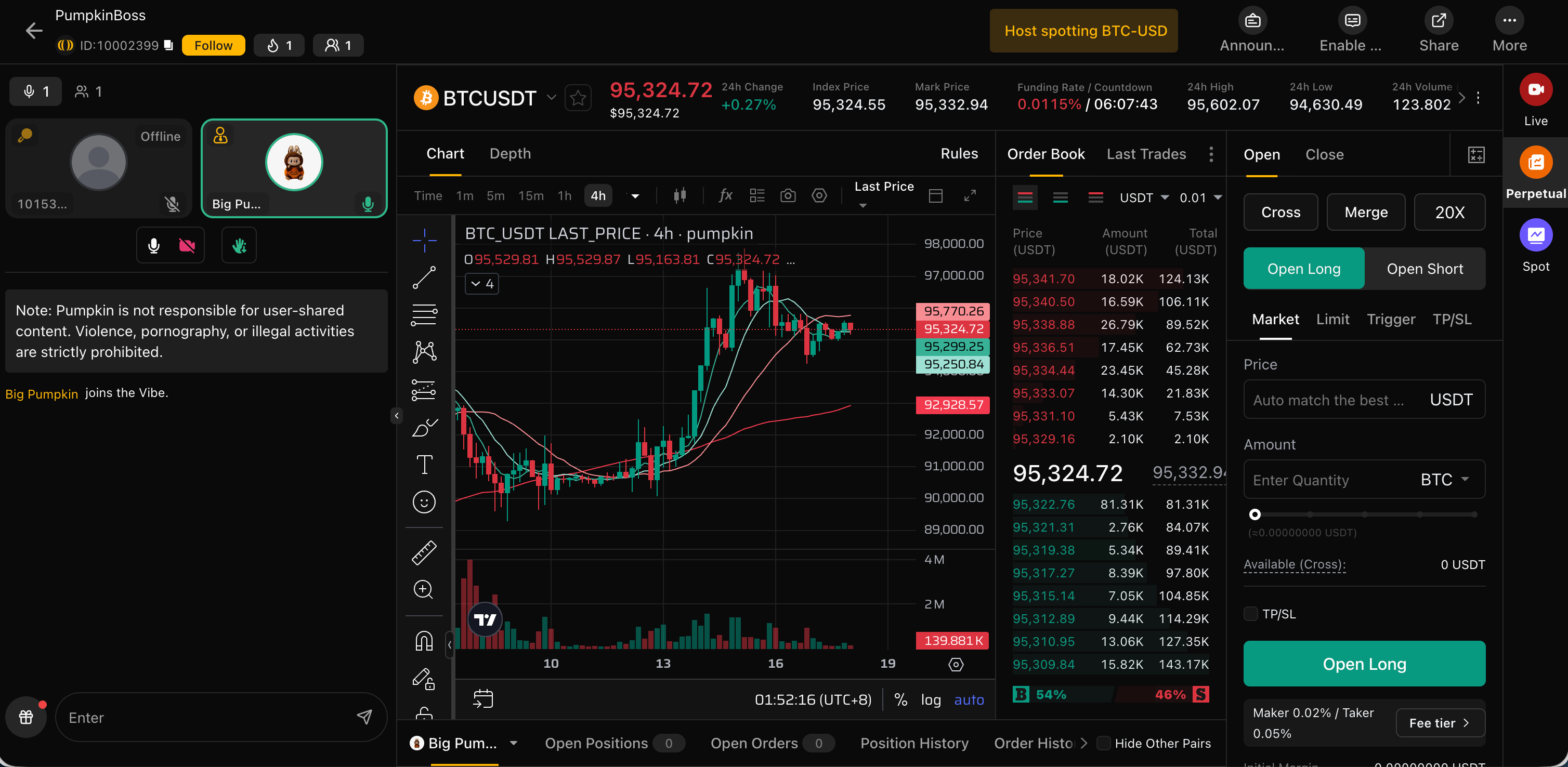
A user opens Pumpkin and selects a market. The market page looks like a professional terminal: chart, depth, funding, positions. But it also answers a question most terminals ignore:
**Who is explaining this market right now?**
Each market page surfaces live rooms actively discussing the instrument. This isn’t a recommendation widget; it is a structural bridge between information and action.
### A room is not a video—it is an execution surface
The user enters a room. The room is a trading environment:
* The room cover displays verifiable performance signals.
* The host and guests can disclose realtime positions (with safety controls).
* Host trades appear in the room instantly as events in chat and bullet comments.
* The user can follow a trade in one tap, without leaving the room.
### Strategy is published as an object, not a suggestion
The host publishes a strategy card during the stream. The card is structured:
* instrument, direction, entry type
* optional risk template (position sizing constraints)
* and an explanation tied to the live context
### Execution becomes truth in realtime
If the trade is spot, the UI is backed by onchain receipts.\
If the trade is perps, the UI is backed by the ZK perps event pipeline.
The result appears in the room as a verified event. This is the crux of the Live Market Layer: the stream becomes a truthful market record, not a performance show.
### The session becomes a replayable artifact
When the stream ends, it doesn’t vanish. Pumpkin records it and indexes it with markers so users can jump to specific moments: entry, scaling, stop moves, exits, or funding events.
### Contribution becomes a weekly economy
Each week, contribution is measured and rewarded through Pumpkin Seeds. This closes the loop: a user’s trading, a creator’s content, and a builder’s tools all connect into the same incentive substrate.
---
# Agent Instructions
This documentation is published with GitBook. GitBook is the documentation platform designed so that both humans and AI agents can read, navigate, and reason over technical content effectively. Learn more at gitbook.com.
## Querying This Documentation
If you need additional information that is not directly available in this page, you can query the documentation by asking a question.
Perform an HTTP GET request on the following URL with the `ask` and `goal` query parameters:
```
GET https://docs.pumpkin.xyz/getting-started/the-pumpkin-story.md?ask=&goal=
```
`ask` is the immediate question: it should be specific, self-contained, and written in natural language.
`goal` is what the user is ultimately trying to achieve, the reason they need the answer. Sharing it helps GitBook give you a better, more relevant answer. A goal is most helpful when it describes the outcome the user wants rather than restating the question. For example, with `ask=how do I create an API token`, a goal like `automate deployments from our CI pipeline` lets GitBook tailor the answer to that use case.
The response will contain a direct answer to the question and relevant excerpts and sources from the documentation.
Use this mechanism when the answer is not explicitly present in the current page, you need clarification or additional context, or you want to retrieve related documentation sections.